How to claim your free plugin
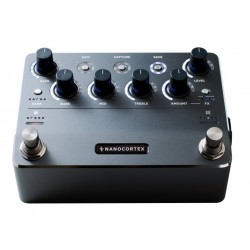
1. Buy a new Nano Cortex from us or any authorized dealer between November 21 and December 3.
2. After receiving your unit, download the Cortex Cloud app and pair your device. If you don’t have a Neural DSP account, you’ll be prompted to create one during setup.
3. In a browser, log in at neuraldsp.com/my-account. In the sidebar, open the Black Friday Plugin Giveaway section and select the Nano Cortex you purchased during the promotional period by choosing its serial number from the list. Note that your unit won’t appear in this section unless it has been paired with the Cortex Cloud app.
4. Upload your proof of purchase in .jpg, .png, or .pdf format. This is required to confirm that the purchase was made within the Black Friday sale window.
5. Wait for validation. Neural support team will review your submission, which may take up to 21 days.
6. Once validated, you’ll receive a notification. Log in to your Neural DSP account to redeem your free plugin.
Note: Neural DSP plugins require a free iLok account and the iLok License Manager software. If you don’t have an iLok account yet, refer to our guide on creating one and installing iLok License Manager.
Once iLok is set up, link your iLok account to your Neural DSP account by entering your iLok User ID in your account settings.
Neural DSP plugins do not run on Nano Cortex. However, Nano Cortex functions as a low-latency class compliant USB-C audio interface that you can connect to your Windows® or Mac® computer."